miércoles, 20 de mayo de 2020

Vlang Binary Debugging

Why vlang? V is a featured, productive, safe and confortable language highly compatible with c, that generates neat binaries with c-speed, the decompilation also seems quite clear as c code.
https://vlang.io/

After open the binary with radare in debug mode "-d" we proceed to do the binary recursive analysis with "aaaa" the more a's the more deep analys.


The function names are modified when the binary is crafted, if we have a function named hello in a module named main we will have the symbol main__hello, but we can locate them quicly thanks to radare's grep done with "~" token in this case applied to the "afl" command which lists all the symbols.


Being in debug mode we can use "d*" commands, for example "db" for breakpointing the function and then "dc" to start or continue execution.


Let's dissasemble the function with "pD" command, it also displays the function variables and arguments as well, note also the xref "call xref from main"


Let's take a look to the function arguments, radare detect's this three 64bits registers used on the function.


Actually the function parameter is rsi that contains a testing html to test the href extraction algorithm.


The string structure is quite simple and it's plenty of implemented methods.


With F8 we can step over the code as we were in ollydbg on linux.


Note the rip marker sliding into the code.


We can recognize the aray creations, and the s.index_after() function used to find substrings since a specific position.


If we take a look de dissasembly we sill see quite a few calls to tos3() functions.
Those functions are involved in string initialization, and implements safety checks.

  • tos(string, len)
  • tos2(byteptr)
  • tos3(charptr)

In this case I have a crash in my V code and I want to know what is crashing, just continue the execution with "dc" and see what poits the rip register.


In visual mode "V" we can see previous instructions to figure out the arguments and state.


We've located the crash on the substring operation which is something like "s2 := s1[a..b]" probably one of the arguments of the substring is out of bounds but luckily the V language has safety checks and is a controlled termination:


Switching the basic block view "space" we can see the execution flow, in this case we know the loops and branches because we have the code but this view also we can see the tos3 parameter "href=" which is useful to locate the position on the code.


When it reach the substr, we can see the parameters with "tab" command.


Looking the implementation the radare parameter calculation is quite exact.


Let's check the param values:


so the indexes are from 0x0e to 0x24 which are inside the buffer, lets continue to next iteration,
if we set a breakpoint and check every iteration, on latest iteration before the crash we have the values 0x2c to 0x70 with overflows the buffer and produces a controlled termination of the v compiled process.


Continue reading


  1. Como Aprender A Hackear Desde Cero
  2. Tipos De Hacker
  3. Hacking Background
  4. Foro Hacking
  5. Tutoriales Hacking
  6. Herramientas Growth Hacking
  7. Udemy Hacking
  8. Hacking 2019
  9. Curso Hacker
  10. Aprender A Hackear Desde Cero
  11. Como Ser Un Buen Hacker
  12. Hacking Wifi
  13. Ingeniería Social El Arte Del Hacking Personal

DOS (Denial Of Service) Attack Tutorial Ping Of Death ;DDOS

What is DoS Attack?

DOS is an attack used to deny legitimate users access to a resource such as accessing a website, network, emails, etc. or making it extremely slow. DoS is the acronym for Denial oService. This type of attack is usually implemented by hitting the target resource such as a web server with too many requests at the same time. This results in the server failing to respond to all the requests. The effect of this can either be crashing the servers or slowing them down.


Cutting off some business from the internet can lead to significant loss of business or money. The internet and computer networks power a lot of businesses. Some organizations such as payment gateways, e-commerce sites entirely depend on the internet to do business.

In this tutorial, we will introduce you to what denial of service attack is, how it is performed and how you can protect against such attacks.

Topics covered in this tutorial

Types of Dos Attacks

There are two types of Dos attacks namely;

  • DoS– this type of attack is performed by a single host
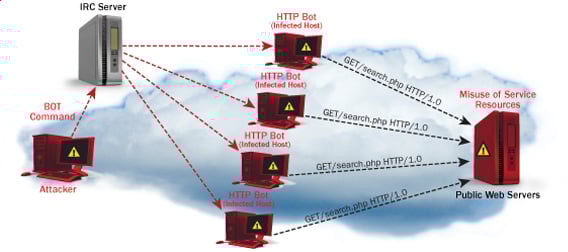
  • Distributed DoS– this type of attack is performed by a number of compromised machines that all target the same victim. It floods the network with data packets.

Ultimate guide to DoS(Denial of Service) Attacks

How DoS attacks work

Let's look at how DoS attacks are performed and the techniques used. We will look at five common types of attacks.

Ping of Death

The ping command is usually used to test the availability of a network resource. It works by sending small data packets to the network resource. The ping of death takes advantage of this and sends data packets above the maximum limit (65,536 bytes) that TCP/IP allows. TCP/IP fragmentation breaks the packets into small chunks that are sent to the server. Since the sent data packages are larger than what the server can handle, the server can freeze, reboot, or crash.

Smurf

This type of attack uses large amounts of Internet Control Message Protocol (ICMP) ping traffic target at an Internet Broadcast Address. The reply IP address is spoofed to that of the intended victim. All the replies are sent to the victim instead of the IP used for the pings. Since a single Internet Broadcast Address can support a maximum of 255 hosts, a smurf attack amplifies a single ping 255 times.  The effect of this is slowing down the network to a point where it is impossible to use it.

Buffer overflow

A buffer is a temporal storage location in RAM that is used to hold data so that the CPU can manipulate it before writing it back to the disc. Buffers have a size limit. This type of attack loads the buffer with more data that it can hold. This causes the buffer to overflow and corrupt the data it holds. An example of a buffer overflow is sending emails with file names that have 256 characters.

Teardrop

This type of attack uses larger data packets. TCP/IP breaks them into fragments that are assembled on the receiving host. The attacker manipulates the packets as they are sent so that they overlap each other. This can cause the intended victim to crash as it tries to re-assemble the packets.

SYN attack

SYN is a short form for Synchronize. This type of attack takes advantage of the three-way handshake to establish communication using TCP. SYN attack works by flooding the victim with incomplete SYN messages. This causes the victim machine to allocate memory resources that are never used and deny access to legitimate users.

DoS attack tools

The following are some of the tools that can be used to perform DoS attacks.

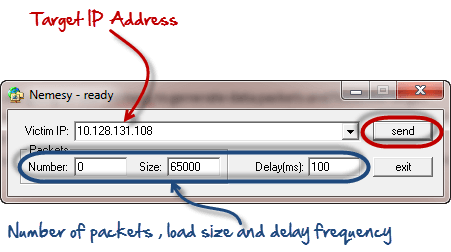
  • Nemesy– this tool can be used to generate random packets. It works on windows. This tool can be downloaded from http://packetstormsecurity.com/files/25599/nemesy13.zip.html . Due to the nature of the program, if you have an antivirus, it will most likely be detected as a virus.
  • Land and LaTierra– this tool can be used for IP spoofing and opening TCP connections
  • Blast– this tool can be downloaded from http://www.opencomm.co.uk/products/blast/features.php
  • Panther- this tool can be used to flood a victim's network with UDP packets.
  • Botnets– these are multitudes of compromised computers on the Internet that can be used to perform a distributed denial of service attack.

DoS Protection: Prevent an attack

An organization can adopt the following policy to protect itself against Denial of Service attacks.

  • Attacks such as SYN flooding take advantage of bugs in the operating system. Installing security patches can help reduce the chances of such attacks.
  • Intrusion detection systems can also be used to identify and even stop illegal activities
  • Firewalls can be used to stop simple DoS attacks by blocking all traffic coming from an attacker by identifying his IP.
  • Routers can be configured via the Access Control List to limit access to the network and drop suspected illegal traffic.

Hacking Activity: Ping of Death

We will assume you are using Windows for this exercise. We will also assume that you have at least two computers that are on the same network. DOS attacks are illegal on networks that you are not authorized to do so. This is why you will need to setup your own network for this exercise.

Open the command prompt on the target computer

Enter the command ipconfig. You will get results similar to the ones shown below

Ultimate guide to DoS(Denial of Service) Attacks

For this example, we are using Mobile Broadband connection details. Take note of the IP address. Note: for this example to be more effective, and you must use a LAN network.

 Switch to the computer that you want to use for the attack and open the command prompt

We will ping our victim computer with infinite data packets of 65500

Enter the following command

ping 10.128.131.108 –t |65500

HERE,

  • "ping" sends the data packets to the victim
  • "10.128.131.108" is the IP address of the victim
  • "-t" means the data packets should be sent until the program is stopped
  • "-l" specifies the data load to be sent to the victim

You will get results similar to the ones shown below

Ultimate guide to DoS(Denial of Service) Attacks

Flooding the target computer with data packets doesn't have much effect on the victim. In order for the attack to be more effective, you should attack the target computer with pings from more than one computer.

The above attack can be used to attacker routers, web servers etc.

If you want to see the effects of the attack on the target computer, you can open the task manager and view the network activities.

  • Right click on the taskbar
  • Select start task manager
  • Click on the network tab
  • You will get results similar to the following

Ultimate guide to DoS(Denial of Service) Attacks

If the attack is successful, you should be able to see increased network activities.


Hacking Activity: Launch a DOS attack

In this practical scenario, we are going to use Nemesy to generate data packets and flood the target computer, router or server.

As stated above, Nemesy will be detected as an illegal program by your anti-virus. You will have to disable the anti-virus for this exercise.

Ultimate guide to DoS(Denial of Service) Attacks

Enter the target IP address, in this example; we have used the target IP we used in the above example.

HERE,

  • 0 as the number of packets means infinity. You can set it to the desired number if you do not want to send, infinity data packets
  • The size field specifies the data bytes to be sent and the delay specifies the time interval in milliseconds.


Click on send button

You should be able to see the following results

Ultimate guide to DoS(Denial of Service) Attacks

The title bar will show you the number of packets sent

Click on halt button to stop the program from sending data packets.

You can monitor the task manager of the target computer to see the network activities.

Summary

  • A denial of service attack's intent is to deny legitimate users access to a resource such as a network, server etc.
  • There are two types of attacks, denial of service and distributed denial of service.
  • A denial of service attack can be carried out using SYN Flooding, Ping of Death, Teardrop, Smurf or buffer overflow
  • Security patches for operating systems, router configuration, firewalls and intrusion detection systems can be used to protect against denial of service attacks.
@EVERYTHING NT
Related links
  1. Blackhat Hacking
  2. Javascript Hacking
  3. Hacking To The Gate
  4. Hacking Growth Pdf
  5. Significado De Hacker
  6. Software Hacking
  7. Elhacker Ip
  8. Hacking Iphone
  9. Hacking Con Python
  10. Hacking Life

Practical Dictionary Attack On IPsec IKE

We found out that in contrast to public knowledge, the Pre-Shared Key (PSK) authentication method in main mode of IKEv1 is susceptible to offline dictionary attacks. This requires only a single active Man-in-the-Middle attack. Thus, if low entropy passwords are used as PSKs, this can easily be broken.

This week at the USENIX Security conference, Dennis Felsch will present our research paper on IPsec attacksThe Dangers of Key Reuse: Practical Attacks on IPsec IKE. [alternative link to the paper]

In his blog post, Dennis showed how to attack the public key encryption based authentication methods of IKEv1 (PKE & RPKE) and how to use this attack against IKEv2 signature based authentication method. In this blog post, I will focus on another interesting finding regarding IKEv1 and the Pre-Shared Key authentication.

IPsec and Internet Key Exchange (IKE)

IPsec enables cryptographic protection of IP packets. It is commonly used to build VPNs (Virtual Private Networks). For key establishment, the IKE protocol is used. IKE exists in two versions, each with different modes, different phases, several authentication methods, and configuration options. Therefore, IKE is one of the most complex cryptographic protocols in use.

In version 1 of IKE (IKEv1), four authentication methods are available for Phase 1, in which initial authenticated keying material is established: Two public key encryption based methods, one signature based method, and a PSK (Pre-Shared Key) based method.

The relationship between IKEv1 Phase 1, Phase 2, and IPsec ESP. Multiple simultaneous Phase 2 connections can be established from a single Phase 1 connection. Grey parts are encrypted, either with IKE derived keys (light grey) or with IPsec keys (dark grey). The numbers at the curly brackets denote the number of messages to be exchanged in the protocol.

Pre-Shared Key authentication

As shown above, Pre-Shared Key authentication is one of three authentication methods in IKEv1. The authentication is based on the knowledge of a shared secret string. In reality, this is probably some sort of password.

The IKEv1 handshake for PSK authentication looks like the following (simplified version):


In the first two messages, the session identifier (inside HDR) and the cryptographic algorithms (proposals) are selected by initiator and responder. 

In messages 3 and 4, they exchange ephemeral Diffie-Hellman shares and nonces. After that, they compute a key k by using their shared secret (PSK) in a PRF function (e.g. HMAC-SHA1) and the previously exchanged nonces. This key is used to derive additional keys (ka, kd, ke). The key kd is used to compute MACI over the session identifier and the shared diffie-hellman secret gxy. Finally, the key ke is used to encrypt IDI (e.g. IPv4 address of the peer) and MACI

Weaknesses of PSK authentication

It is well known that the aggressive mode of authentication in combination with PSK is insecure and vulnerable against off-line dictionary attacks, by simply eavesedropping the packets. For example, in strongSwan it is necessary to set the following configuration flag in order to use it:
charon.i_dont_care_about_security_and_use_aggressive_mode_psk=yes

For the main mode, we found a similar attack when doing some minor additional work. For that, the attacker needs to waits until a peer A (initiator) tries to connect to another peer B (responder). Then, the attacker acts as a man-in-the middle and behaves like the peer B would, but does not forward the packets to B.

From the picture above it should be clear that an attacker who acts as B can compute (gxy) and receives the necessary public values session ID, nI, nR. However, the attacker does not know the PSK. In order to mount a dictionary attack against this value, he uses the nonces, and computes a candidate for for every entry in the dictionary. It is necessary to make a key derivation for every k with the values of the session identifiers and shared Diffie-Hellmann secret the possible keys ka, kd and ke. Then, the attacker uses ke in order to decrypt the encrypted part of message 5. Due to IDI often being an IP address plus some additional data of the initiator, the attacker can easily determine if the correct PSK has been found.

Who is affected?

This weakness exists in the IKEv1 standard (RFC 2409). Every software or hardware that is compliant to this standard is affected. Therefore, we encourage all vendors, companies, and developers to at least ensure that high-entropy Pre-Shared Keys are used in IKEv1 configurations.

In order to verify the attack, we tested the attack against strongSWAN 5.5.1.

Proof-of-Concept

We have implemented a PoC that runs a dictionary attack against a network capture (pcapng) of a IKEv1 main mode session. As input, it also requires the Diffie-Hellmann secret as described above. You can find the source code at github. We only tested the attack against strongSWAN 5.5.1. If you want to use the PoC against another implementation or session, you have to adjust the idHex value in main.py.

Responsible Disclosure

We reported our findings to the international CERT at July 6th, 2018. We were informed that they contacted over 250 parties about the weakness. The CVE ID for it is CVE-2018-5389 [cert entry].

Credits

On August 10th, 2018, we learned that this attack against IKEv1 main mode with PSKs was previously described by David McGrew in his blog post Great Cipher, But Where Did You Get That Key?. We would like to point out that neither we nor the USENIX reviewers nor the CERT were obviously aware of this.
On August 14th 2018, Graham Bartlett (Cisco) email us that he presented the weakness of PSK in IKEv2 in several public presentations and in his book.
On August 15th 2018, we were informed by Tamir Zegman that John Pliam described the attack on his web page in 1999.

FAQs

  • Do you have a name, logo, any merchandising for the attack?
    No.
  • Have I been attacked?
    We mentioned above that such an attack would require an active man-in-the-middle attack. In the logs this could look like a failed connection attempt or a session timed out. But this is a rather weak indication and no evidence for an attack. 
  • What should I do?
    If you do not have the option to switch to authentication with digital signatures, choose a Pre-Shared Key that resists dictionary attacks. If you want to achieve e.g. 128 bits of security, configure a PSK with at least 19 random ASCII characters. And do not use something that can be found in public databases.
  • Am I safe if I use PSKs with IKEv2?
    No, interestingly the standard also mentions that IKEv2 does not prevent against off-line dictionary attacks.
  • Where can I learn more?
    You can read the paper[alternative link to the paper]
  • What else does the paper contain?
    The paper contains a lot more details than this blogpost. It explains all authentication methods of IKEv1 and it gives message flow diagrams of the protocol. There, we describe a variant of the attack that uses the Bleichenbacher oracles to forge signatures to target IKEv2. 

Related links


  1. Hacking Etico Que Es
  2. Libro Hacking Etico
  3. Kali Linux Hacking
  4. Hacking Pdf
  5. Certificacion Ethical Hacking
  6. Bluetooth Hacking
  7. Hacking Web Technologies Pdf
  8. Blackhat Hacking
  9. Hacking 2019

martes, 19 de mayo de 2020

Evilreg - Reverse Shell Using Windows Registry Files (.Reg)


Reverse shell using Windows Registry file (.reg).

Features:

Requirements:
  • Ngrok Authtoken (for TCP Tunneling): Sign up at: https://ngrok.com/signup
  • Your authtoken is available on your dashboard: https://dashboard.ngrok.com
  • Install your auhtoken: ./ngrok authtoken <YOUR_AUTHTOKEN>
  • Target must reboot/re-login after installing the .reg file

Legal disclaimer:
Usage of Evilreg for attacking targets without prior mutual consent is illegal. It's the end user's responsibility to obey all applicable local, state and federal laws. Developers assume no liability and are not responsible for any misuse or damage caused by this program

Usage:
git clone https://github.com/thelinuxchoice/evilreg
cd evilreg
bash evilreg.sh

Author: github.com/thelinuxchoice
Twitter: twitter.com/linux_choice


via KitPloit

Related word


lunes, 18 de mayo de 2020

Linux Command Line Hackery Series: Part 2


Welcome back to Linux Command Line Hackery, yes this is Part 2 and today we are going to learn some new skills. Let's rock

Let us first recap what we did in Part 1, if you are not sure what the following commands do then you should read Part 1.

mkdir myfiles                                                # make a directory (folder) with myfiles as name
cd myfiles                                                      # navigate to myfiles folder
touch file1 file2 file3                                    # create three empty files file1file2file3
ls -l                                                                   # view contents of current directory
echo This is file1 > file1                               # write a line of text to file1
cat file1                                                           # display contents of file1
echo This is another line in file1 >> file1    # append another line of text to file1
cat file1                                                          # display the modified content of file1

Command:  cp
Syntax:        cp source1 [source2 ...] destination
Function:     cp stands for copy. cp is used to copy a file from source to destination. Some important flags are mentioned below
Flags:          -r copy directories recursively
                     -f if an existing destination file cannot be opened, remove it and try  again

Let us make a copy of file1 using the new cp command:

cp file1 file1.bak

what this command is going to do is simply copy file1 to another file named file1.bak. You can name the destination file anything you want.
Say, you have to copy file1 to a different folder maybe to home directory how can we do that? well we can do that like this:

cp file /home/user/

I've used the absolute path here you can use whatever you like.
[Trick: ~ has a special meaning, it stands for logged in user's directory. You could have written previous command simply as
cp file1 ~/
and it would have done the same thing.]
Now you want to create a new directory in myfiles directory with the name backup and store all files of myfiles directory in the backup directory. Let's try it:

mkdir backup
cp file1 file2 file3 backup/

this command will copy file1 file2 file3 to backup directory.
We can copy multiple files using cp by specifying the directory to which files must be copied at the end.
We can also copy whole directory and all files and sub-directories in a directory using cp. In order to make a backup copy of myfiles directory and all of it's contents we will type:

cd ..                                           # navigate to previous directory
cp -r myfiles myfiles.bak       # recursively copy all contents of myfiles directory to myfiles.bak directory

This command will copy myfiles directory to myfiles.bak directory including all files and sub-directories

Command: mv
Syntax:       mv source1 [source2 ...] destination
Function:    mv stands for move. It is used for moving files from one place to another (cut/paste in GUI) and also for renaming the files.

If we want to rename our file1 to  file1.old in our myfiles folder we'll do the follow:

cd myfiles                                      # navigate first to myfiles folder
mv file1 file1.old

this command will rename the file1 to file1.old (it really has got so old now). Now say we want to create a new file1 file in our myfiles folder and move the file1.old file to our backup folder:

mv file1.old backup/                    # move (cut/paste) the file1.old file to backup directory
touch file1                                    # create a new file called file1
echo New file1 here > file1         # echo some content into file1

Command:  rmdir
Syntax: rmdir directory_name
Function: rmdir stands for remove directory. It is used for removing empty directories.

Let's create an empty directory in our myfiles directory called 'garbage' and then remove it using rmdir:

mkdir garbage
rmdir  garbage

Good practice keep it doing. (*_*)
But wait a second, I said empty directory! does it mean I cannot delete a directory which has contents in it (files and sub-directories) with rmdir? Yes!, you cannot do that with rmdir
So how am I gonna do that, well keep reading...

Command:  rm
Syntax:        rm FILE...
Function:     rm stands for remove. It is used to remove files and directories. Some of it's important flags are enlisted below.
Flags:          -r remove directories and their contents recursively
                     -f ignore nonexistent files and arguments, never prompt

Now let's say we want to delete the file file1.old in backup folder. Here is how we will do that:

rm backup/file1.old                # using relative path here

Boom! the file is gone. Keep in mind one thing when using rm "IT IS DESTRUCTIVE!". No I'm not yelling at you, I'm just warning you that when you use rm to delete a file it doesn't go to Trash (or Recycle Bin). Rather it is deleted and you cannot get it back (unless you use some special tools quickly). So don't try this at home. I'm just kidding but yes try it cautiously otherwise you are going to loose something important.

Did You said that we can delete directory as well with rm? Yes!, I did. You can delete a directory and all of it's contents with rm by just typing:

rm -r directory_name

Maybe we want to delete backup directory from our myfiles directory, just do this:

rm -r backup

And it is gone now.
Remember what I said about rm, use it with cautious and use rm -r more cautiously (believe me it costs a lot). -r flag will remove not just the files in directory it will also remove any sub-directories in that directory and there respective contents as well.

That is it for this article. I've said that I'll make each article short so that It can be learned quickly and remembered for longer time. I don't wanna bore you.
More info
  1. Wordpress Hacking
  2. Hacking Meaning
  3. Libro Hacker
  4. Sean Ellis Hacking Growth
  5. Reddit Hacking

Vulcan DoS Vs Akamai

In the past I had to do several DoS security audits, with múltiples types of tests and intensities. Sometimes several DDoS protections were present like Akamai for static content, and Arbor for absorb part of the bandwith.

One consideration for the DoS/DDoS tools is that probably it will loss the control of the attacker host, and the tool at least has to be able to stop automatically with a timeout, but can also implement remote response checks.

In order to size the minimum mbps needed to flood a service or to retard the response in a significant amount of time, the attacker hosts need a bandwith limiter, that increments in a logarithmic way up to a limit agreed with the customer/isp/cpd.

There are DoS tools that doesn't have this timeouts, and bandwith limit based on mbps, for that reason I have to implement a LD_PRELOAD based solution: bwcontrol

Although there are several good tools for stressing web servers and web aplications like apache ab, or other common tools used for pen-testing, but I also wrote a fast web flooder in c++ named wflood.

As expected the most effective for taking down the web server are the slow-loris, slow-read and derivatives, few host were needed to DoS an online banking. 
Remote attacks to database and highly dynamic web content were discarded, that could be impacted for sure.

I did another tool in c++ for crafting massive tcp/udp/ip malformed packets, that impacted sometimes on load balancers and firewalls, it was vulcan, it freezed even the firewall client software.

The funny thing was that the common attacks against Akamai hosts, where ineffective, and so does the slow-loris family of attacks, because are common, and the Akamai nginx webservers are well tunned. But when tried vulcan, few intensity was enough to crash Akamai hosts.

Another attack vector for static sites was trying to locate the IP of the customer instead of Akamai, if the customer doesn't use the Akamai Shadow service, it's possible to perform a HTTP Host header scan, and direct the attack to that host bypassing Akamai.

And what about Arbor protection? is good for reducing the flood but there are other kind of attacks, and this protection use to be disabled by default and in local holidays can be a mess.

Related word

  1. Elhacker Ip
  2. Hacking Wikipedia
  3. Libros De Hacking Pdf
  4. Significado De Hacker

domingo, 17 de mayo de 2020

Improper Microsoft Patch For Reverse RDP Attacks Leaves 3rd-Party RDP Clients Vulnerable

Remember the Reverse RDP Attack—wherein a client system vulnerable to a path traversal vulnerability could get compromised when remotely accessing a server over Microsoft's Remote Desktop Protocol? Though Microsoft had patched the vulnerability (CVE-2019-0887) as part of its July 2019 Patch Tuesday update, it turns out researchers were able to bypass the patch just by replacing the backward

via The Hacker News
Related word